Introduction

This guide explains how to prepare a Windows system for deploying Helical Insight using Docker.

Helical Insight runs as Linux-based Docker containers. While Docker Desktop allows these containers to run on Windows, the best performance is achieved by using Windows Subsystem for Linux 2 (WSL2) with an Ubuntu distribution. Running the deployment from the Ubuntu filesystem significantly reduces filesystem overhead and provides performance comparable to a native Linux environment.

This guide walks you through:

  • Installing WSL2 (if not already installed)
  • Installing and configuring Ubuntu
  • Creating a deployment directory inside the Ubuntu filesystem
  • Copying and extracting the Helical Insight Docker package
  • Installing Docker Desktop
  • Enabling WSL integration with Docker Desktop

ver

After completing this guide, your Windows environment will be ready for deploying Helical Insight using the Installation via Docker of Open Source BI Helical Insight.

Note: This guide is intended only for Windows users. Linux and macOS users can proceed directly with the Installation via Docker of Open Source BI Helical Insight.

Why Use WSL2?

Docker Desktop stores Linux containers inside the WSL2 environment.

When Helical Insight is deployed from the Windows filesystem (for example, C:\Users\… or /mnt/c/…), filesystem operations are significantly slower because every file operation crosses the Windows–Linux boundary.

This can increase deployment time considerably.

Deploying directly from the Ubuntu filesystem inside WSL2 provides performance comparable to a native Linux installation.


Recommendation

For this reason, Helical Insight recommends performing Docker deployments from the Ubuntu filesystem whenever Windows is used.

1. Install WSL2

If WSL2 is not already installed, open PowerShell as Administrator and execute:

wsl.exe –install ubuntu

This install:

  • WSL2
  • Ubuntu
  • Required Linux kernel components

Restart the machine if prompted.

If WSL is already installed, update it using:

wsl –update

Verify WSL Installation

Run:

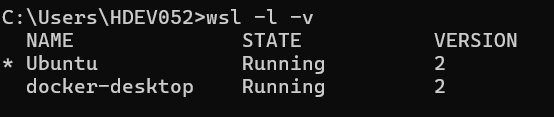
wsl -l -v

Installation via Docker of Open Source BI Helical Insight
Preparing Windows (WSL2) for Helical Insight Docker Deployment


Verify that:

  • Ubuntu is installed.
  • Version is 2.

2. Install Ubuntu Distribution

Install Ubuntu from the Microsoft Store if it is not already installed, then launch it after installation.

3. Create a User in Ubuntu

During the first launch, Ubuntu will prompt you to create a username and password. Use these credentials to access the Ubuntu terminal.

Note: Open Ubuntu Terminal

4. Create Deployment Directory

Inside the Ubuntu terminal, create a directory for deployment:

Preparing Windows (WSL2) for Helical Insight Docker Deployment

5. Copy and UNZIP Application Files via Windows File Explorer

Open Windows File Explorer and navigate to the WSL Ubuntu path below. Copy the downloaded Helical Insight ZIP into this folder, then unzip it here inside the Ubuntu filesystem:

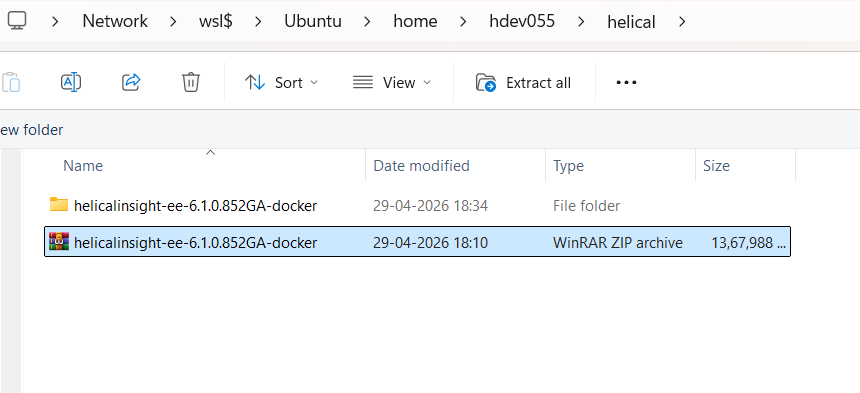
Replace <User> with your User

Preparing Windows (WSL2) for Helical Insight Docker Deployment

Preparing Windows (WSL2) for Helical Insight Docker Deployment

Note: Do NOT run the deployment from the Windows filesystem path such as /mnt/c/Users/… Always use the Ubuntu filesystem (/home/<username>/helical) for optimal Docker performance.

6. Install Docker Desktop

Install Docker Desktop using the standard installer.

After installation:

  • Start Docker Desktop.
  • Wait until Docker is running successfully.

7. Enable WSL Integration

Open Docker Desktop.

Navigate to:

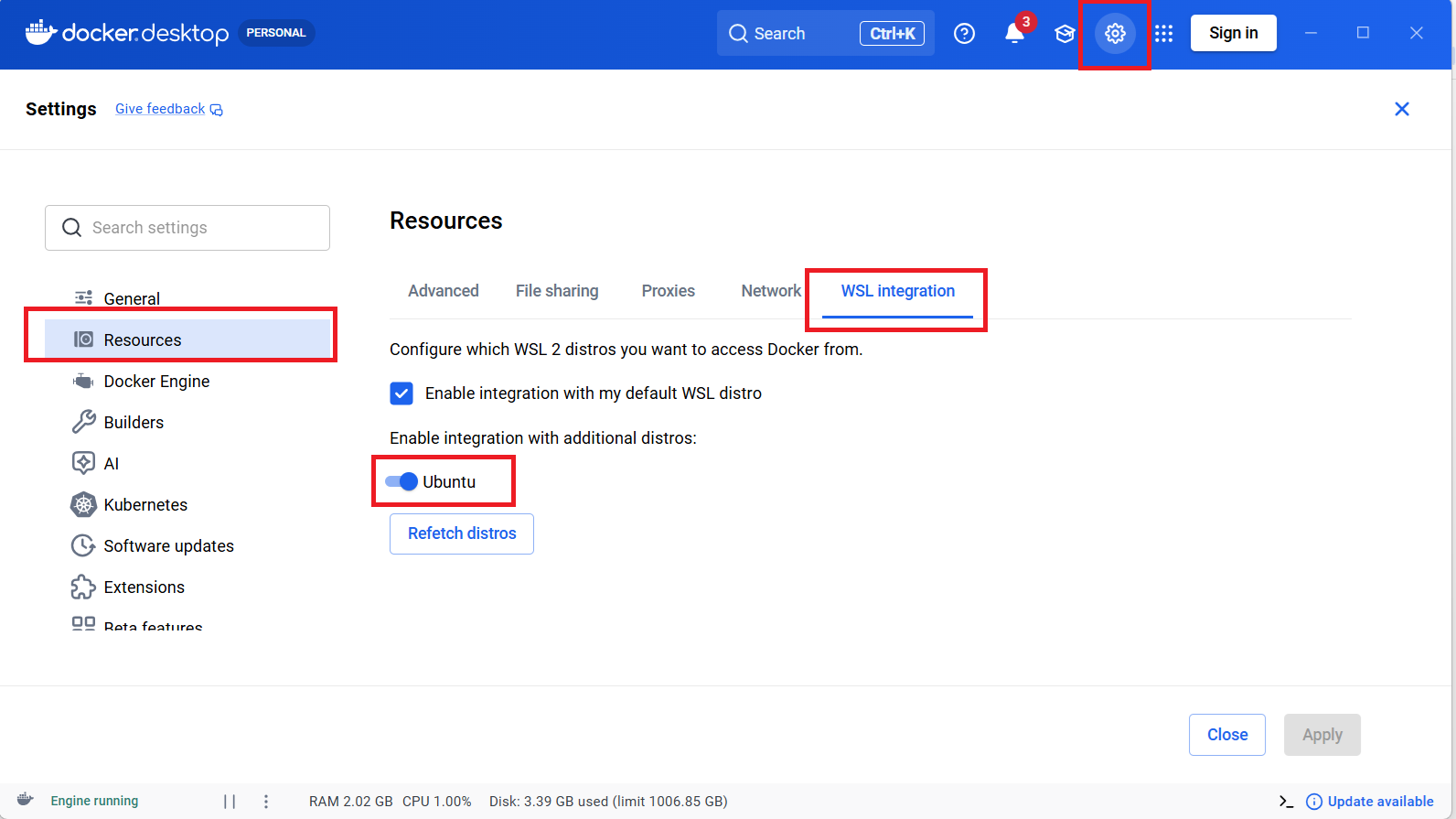
Settings → Resources → WSL Integration

Enable integration for your Ubuntu distribution.

This allows Docker Desktop to access the Linux filesystem directly through WSL2.
Preparing Windows (WSL2) for Helical Insight Docker Deployment


Docker Desktop

Docker Desktop → Settings → Resources → WSL Integration — enable the Ubuntu toggle for Ubuntu as shown

Conclusion

Your Windows environment is now prepared for deploying Helical Insight using Docker.

By completing this guide, you have:

  • Installed and configured WSL2 with Ubuntu.
  • Prepared a deployment directory inside the Ubuntu filesystem.
  • Installed Docker Desktop.
  • Enabled Docker Desktop integration with WSL2.
  • Configured your environment to run Docker containers with optimal filesystem performance.

You are now ready to deploy Helical Insight.

Continue with the Installation via Docker of Open Source BI Helical Insight, which covers:

  • Downloading the Helical Insight Docker deployment package.
  • Reviewing the deployment configuration.
  • Starting the Docker deployment using docker compose up -d.
  • Verifying that all containers are running and healthy.
  • Accessing the Helical Insight application.


Final Note

Following the installation guide will complete your Helical Insight deployment on Windows.

Leave a Reply

Helical Insight’s self-service capabilities is one to reckon with. It allows you to simply drag and drop columns, add filters, apply aggregate functions if required, and create reports and dashboards on the fly. For advanced users, the self-service component has ability to add javascript, HTML, HTML5, CSS, CSS3 and AJAX. These customizations allow you to create dynamic reports and dashboards. You can also add new charts inside the self-service component, add new kind of aggregate functions and customize it using our APIs.
Helical Insight, via simple browser based interface of Canned Reporting module, also allows to create pixel perfect printer friendly document kind of reports also like Invoice, P&L Statement, Balance sheet etc.
If you have a product, built on any platform like Dot Net or Java or PHP or Ruby, you can easily embed Helical Insight within it using iFrames or webservices, for quick value add through instant visualization of data.
Being a 100% browser-based BI tool, you can connect with your database and analyse across any location and device. There is no need to download or install heavy memory-consuming developer tools – All you need is a Browser application! We are battle-tested on most of the commonly used browsers.
We have organization level security where the Superadmin can create, delete and modify roles. Dashboards and reports can be added to that organization. This ensures multitenancy.
A first-of-its-kind Open-Source BI framework, Helical Insight is completely API-driven. This allows you to add functionalities, including but not limited to adding a new exporting type, new datasource type, core functionality expansion, new charting in adhoc etc., at any place whenever you wish, using your own in-house developers.
It handles huge volumes of data effectively. Caching, Pagination, Load-Balancing and In-Memory not only provides you with amazing experience, but also and does not burden the database server more than required. Further effective use of computing power gives best performance and complex calculations even on the big data even with smaller machines for your personal use. Filtering, Sorting, Cube Analysis, Inter Panel Communication on the dashboards all at lightning speed. Thereby, making best open-source Business Intelligence solution in the market.
With advance NLP algorithm, business users simply ask questions like, “show me sales of last quarter”, “average monthly sales of my products”. Let the application give the power to users without knowledge of query language or underlying data architecture
Our application is compatible with almost all databases, be it RDBMS, or columnar database, or even flat files like spreadsheets or csv files. You can even connect to your own custom database via JDBC connection. Further, our database connection can be switched dynamically based on logged in users or its organization or other parameters. So, all your clients can use the same reports and dashboards without worrying about any data security breech.
Our application can be installed on an in-house server where you have full control of your data and its security. Or on cloud where it is accessible to larger audience without overheads and maintenance of the servers. One solution that works for all.
Different companies have different business processes that the existing BI tools do not encompass. Helical Insight permits you to design your own workflows and specify what functional module of BI gets triggered