Introduction

As a Business Intelligence application is used regularly, various background operations (like logs, cached data) takes place to support application functionality, maintain audit information, and manage temporary files generated during different activities.

Over time, this data can become really big, thus affecting the application performance as such.

To simplify these administrative tasks, Helical Insight 7.1.0.375 RC2 introduces System Schedules, a set of predefined schedules designed to automate certain internal application maintenance and housekeeping activities.

These system schedules cover different aspects of application maintenance, including:

  • Instant BI Usage Audit Details: Handles scheduled activities associated with Instant BI usage audit information.
  • Temporary Directory Cleanup: Helps clean up temporary files and directories generated during application operations.
  • Import/Export Related Temporary Files: Handles cleanup of temporary files associated with import and export operations.
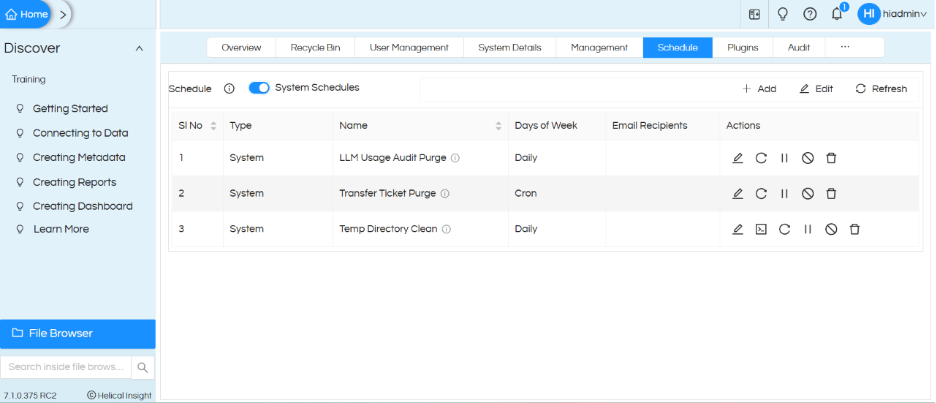
System Schedule

Administrators can access these predefined schedules from the Schedules tab, modify their execution configurations, and create additional schedules based on their requirements.

As shown below we can click on the toggle button to see the System schedules. On those prebuilt schedules, you further have option to edit the schedule, run the schedule immediately, pause, delete and other operations. Via top you even have option to write a new System Schedule as well.
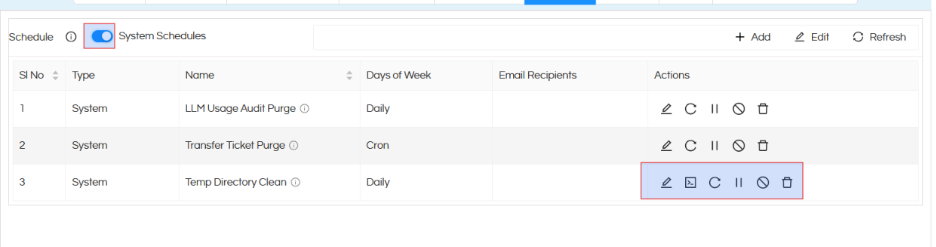
System Schedule

1. Instant BI Usage Audit Details

This system schedule is associated with maintaining and processing Instant BI usage audit information. Instant BI usage audit details help maintain information related to Instant BI usage within the application. The corresponding system schedule automates its associated housekeeping activity.

2. Temporary Directory Cleanup

During report execution, export generation, and other application operations, Helical Insight may generate temporary files and folders. These files may be required only for the duration of a particular operation. Once they are no longer needed, retaining them indefinitely can result in unnecessary storage consumption.

The Temporary Directory Cleanup system schedule helps automate the cleanup of temporary directories, ensuring that unnecessary temporary files do not continue accumulating.

This is particularly useful in environments where users frequently execute reports, generate exports, and perform other operations that produce temporary files.

3. Import/Export Related Temporary Files

Helical Insight generates temporary files while performing import and export operations.

For example, when administrators import or export application resources, intermediate files may be created to facilitate the process.

The Import/Export Related Temporary Files system schedule is designed to handle the cleanup of temporary files associated with these operations.

Automating this activity helps prevent the accumulation of unnecessary import/export-related files.

Recommendation: Before changing the execution frequency of any system schedule, administrators should consider application usage patterns, report execution frequency, and the operational requirements of their environment. It is a good practice to take backup of the same before editing the prebuilt system schedules.

Creating Additional System Schedules

Apart from the predefined system schedules, administrators can also create additional schedules based on their requirements.

This provides flexibility to extend scheduled housekeeping and maintenance activities as needed.

For example, administrators may want to introduce additional scheduled activities to support specific operational or maintenance requirements within their deployment.

The ability to create additional schedules makes the scheduling functionality more flexible and allows organizations to manage recurring tasks without depending entirely on manual intervention.

When creating additional schedules, administrators should ensure that the configured task, execution frequency, and associated operations are appropriate for their deployment.

Benefits of Automatic Temporary File Cleanup

The automatic cleanup functionality in Helical Insight 7.1 provides several operational benefits.

1. Reduced Temporary File Accumulation

Temporary files generated during report execution, export processing, and other application activities can accumulate over time. Scheduled cleanup helps remove unnecessary files and prevents uncontrolled accumulation.

2. Better Storage Management

By periodically removing files that are no longer required, the application can utilize available disk space more efficiently.

3. Reduced Manual Administration

Administrators do not need to depend entirely on manual housekeeping activities. Predefined schedules automate recurring cleanup operations.

4. Improved Application Maintenance

Regular cleanup is an important part of application maintenance. Automated housekeeping helps maintain a cleaner application environment and reduces unnecessary resource consumption.

5. Flexible Scheduling

Administrators can modify existing system schedules and create additional schedules to align housekeeping activities with their organization’s operational requirements.

Best Practices for Administrators

To make effective use of the Automatic Temporary File Cleanup functionality, consider the following recommendations:

  • Review predefined system schedules: Understand the purpose of each available system schedule before making changes.
  • Configure appropriate execution intervals: Choose cleanup frequencies based on application usage and operational requirements.
  • Monitor disk space utilization: Periodically monitor available disk space to identify potential storage-related issues.
  • Avoid unnecessary schedule modifications: Retain the default configurations unless there is a specific operational requirement to change them.
  • Plan maintenance activities: Where possible, configure housekeeping schedules to execute during periods of relatively low application activity.
  • Validate additional schedules: When creating custom schedules, verify that the configured operations are appropriate and do not interfere with regular application activities.

You can read about the admin activities of email scheduling/report bursting of built reports/dashboards here.

In case of any questions, please reach out to us on support@helicalinsight.com or you can raise your questions on https://forum.helicalinsight.com/

Leave a Reply

Helical Insight’s self-service capabilities is one to reckon with. It allows you to simply drag and drop columns, add filters, apply aggregate functions if required, and create reports and dashboards on the fly. For advanced users, the self-service component has ability to add javascript, HTML, HTML5, CSS, CSS3 and AJAX. These customizations allow you to create dynamic reports and dashboards. You can also add new charts inside the self-service component, add new kind of aggregate functions and customize it using our APIs.
Helical Insight, via simple browser based interface of Canned Reporting module, also allows to create pixel perfect printer friendly document kind of reports also like Invoice, P&L Statement, Balance sheet etc.
If you have a product, built on any platform like Dot Net or Java or PHP or Ruby, you can easily embed Helical Insight within it using iFrames or webservices, for quick value add through instant visualization of data.
Being a 100% browser-based BI tool, you can connect with your database and analyse across any location and device. There is no need to download or install heavy memory-consuming developer tools – All you need is a Browser application! We are battle-tested on most of the commonly used browsers.
We have organization level security where the Superadmin can create, delete and modify roles. Dashboards and reports can be added to that organization. This ensures multitenancy.
A first-of-its-kind Open-Source BI framework, Helical Insight is completely API-driven. This allows you to add functionalities, including but not limited to adding a new exporting type, new datasource type, core functionality expansion, new charting in adhoc etc., at any place whenever you wish, using your own in-house developers.
It handles huge volumes of data effectively. Caching, Pagination, Load-Balancing and In-Memory not only provides you with amazing experience, but also and does not burden the database server more than required. Further effective use of computing power gives best performance and complex calculations even on the big data even with smaller machines for your personal use. Filtering, Sorting, Cube Analysis, Inter Panel Communication on the dashboards all at lightning speed. Thereby, making best open-source Business Intelligence solution in the market.
With advance NLP algorithm, business users simply ask questions like, “show me sales of last quarter”, “average monthly sales of my products”. Let the application give the power to users without knowledge of query language or underlying data architecture
Our application is compatible with almost all databases, be it RDBMS, or columnar database, or even flat files like spreadsheets or csv files. You can even connect to your own custom database via JDBC connection. Further, our database connection can be switched dynamically based on logged in users or its organization or other parameters. So, all your clients can use the same reports and dashboards without worrying about any data security breech.
Our application can be installed on an in-house server where you have full control of your data and its security. Or on cloud where it is accessible to larger audience without overheads and maintenance of the servers. One solution that works for all.
Different companies have different business processes that the existing BI tools do not encompass. Helical Insight permits you to design your own workflows and specify what functional module of BI gets triggered