
Overview
Helical Insight Version 7.0 represents a transformative milestone in open-source Business Intelligence. Building on the high-performance streaming cache architecture established in Version 6.2.1, this release pivots the platform into an AI-native, declarative BI framework that merges three distinct generations of analytics into a single, unified data operating system.
The core pillars of Version 7.0 include:
- Generative BI & Conversational Analytics (Instant BI): Empowering non-technical business users to interact with enterprise data warehouses using natural language, receiving instant interactive charts, tables, and KPIs without writing SQL.
- Bring Your Own LLM (BYO-LLM) Architecture: A dedicated frontend administration console supporting leading commercial models (OpenAI, Gemini, Anthropic, Groq, DeepSeek) as well as 100% private, air-gapped deployments via Ollama.
- Universal Declarative JSON Specifications: Exposing the full configuration of reports, dashboards, canned reports, and semantic models as human-readable JSON for GitOps version control, rapid templating, and programmatic AI generation.
PRO TIP: Version 7.0 retains full backwards compatibility with all streaming cache configurations from Version 6.2.1, ensuring sub-second execution on large enterprise datasets.
1. The Open Source Edition
With version 7.0, we have also launched our enterprise edition as a FULLY FREE version as well. Other open source reporting & BI tools (like Superset, Metabase, LightDash, Jaspersoft, Pentaho, Lightdash etc) have a free open source community edition with very limited features.
Whereas with Helical Insight all the enterprise features which are there in the paid version are also present in the Community Open-Source Edition of Helical Insight as well. All core features—including AI capabilities, interactive dashboards, paginated reports, multi-tenancy, and embedding—are available in the Community Edition at no cost. Read about the coverage here on famous OpenSourceForYou magazine.
- Full Ad-Hoc Report Engine (HReport): Complete drag-and-drop canvas with chart libraries, custom columns, and raw database functions.
- Interactive Dashboard Designer: Multi-tab dashboards, dynamic filters, responsive grid layouts, and inter-component communication.
- Universal Database Connectivity: Out-of-the-box drivers for PostgreSQL, MySQL, ClickHouse, SQLite, MongoDB, and modern data warehouses.
- Open API & Plugin Architecture: Extensive REST API endpoints and plugin hooks.
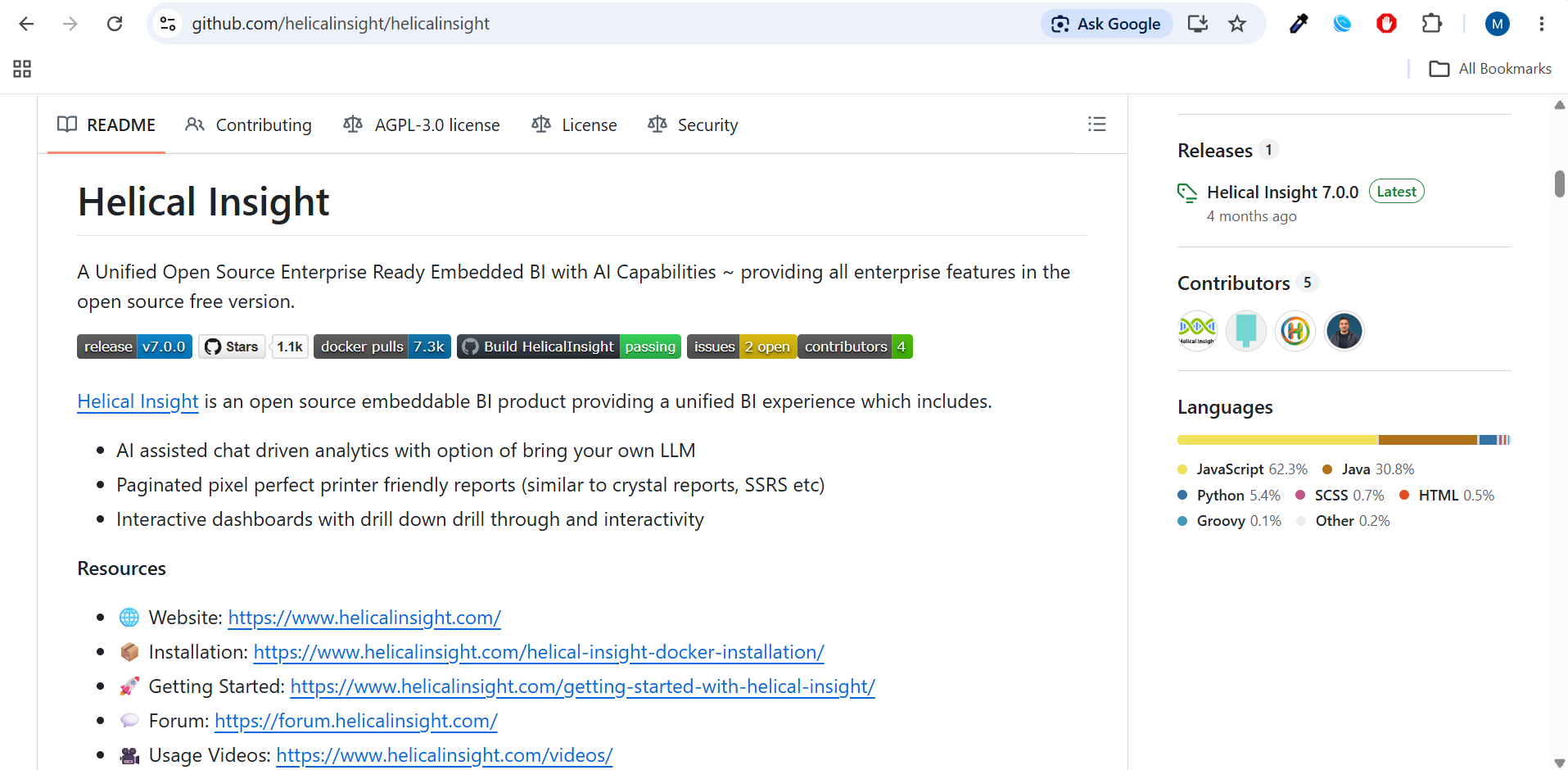
🔗 Github link of community version: https://github.com/helicalinsight/helicalinsight
Differences between Community and Enterprise version : Community driven innovation via Helical Insight CE – Helical Insight
Enterprise version download link: Register – Helical Insight
2. Instant BI: AI-Powered Conversational Analytics
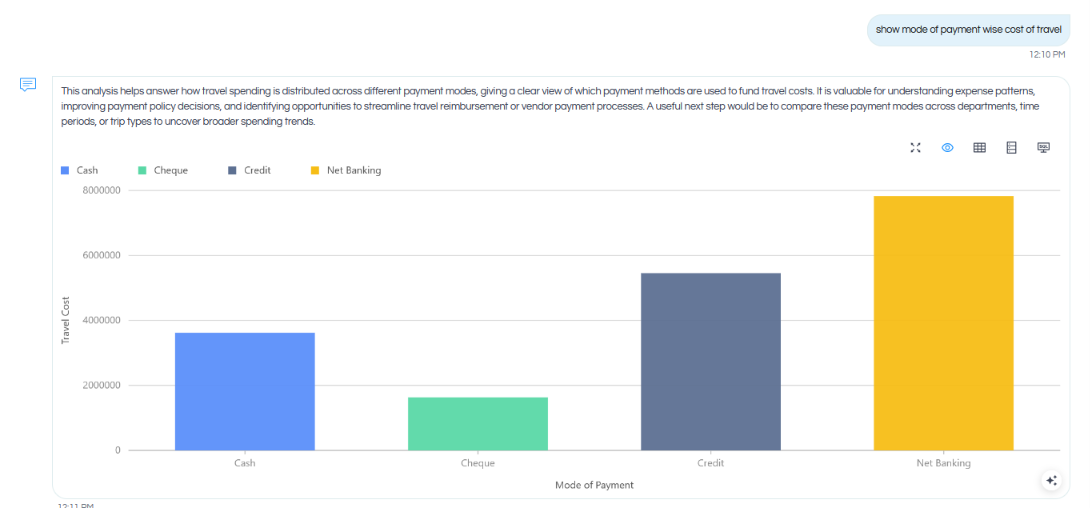
Instant BI is the new AI powered data analytics module which is introduced which can allow even non technical business users to directly ask questions from the data in natural, plain English and receive instant interactive visualizations. The same analysis can be saved, shared, used in dashboard, edited and further operations can be done. The other set of features like the data security, multi-tenancy etc are also still applicable.
2.1 The No-Black-Box Architecture
Unlike opaque commercial AI analytics tools, Helical Insight implements a transparent, auditable architecture:
- Verifiable SQL Generation: Every prompt displays the exact generated SQL query. Users can expand the SQL panel to inspect tables, joins, WHERE clauses, and aggregation logic.
- Metadata-Only Privacy: Only semantic metadata, schema topologies, and business aliases are sent to the LLM. Raw data rows never leave your secure perimeter. Hence data is very secure
- One-Click BI Bridge (“Explore This Chart”): AI-generated charts can be instantly imported into the Ad-Hoc Report Designer for further customization, conditional formatting, threshold alerts, and drill-downs.
- Data Security: Even though the AI analytics can be exposed to any user/client/tenant, people can ask questions but they will get to see their own data set only
2.2 Instant BI Usage Interface
- Smart Contextual Prompt Bar: Instant BI analyzes the active Semantic Model and suggests intelligent starter prompts such as ‘Show top 5 revenue-generating product categories last quarter’.
- Multi-Turn Stateful Conversations: Users can iteratively refine results across turns. After seeing global sales, they can type ‘Now filter this to Europe and highlight orders above $50,000’ with full context preservation.
- In-Preview Visualization Switcher: Directly on the response card, switch between Bar, Line, Spline, Area, Pie/Donut, and Tabular views without regenerating SQL or consuming additional tokens.
- Live Token Usage Meter: Real-time feedback on input prompt tokens, output completion tokens, and remaining token balances for the connected model.
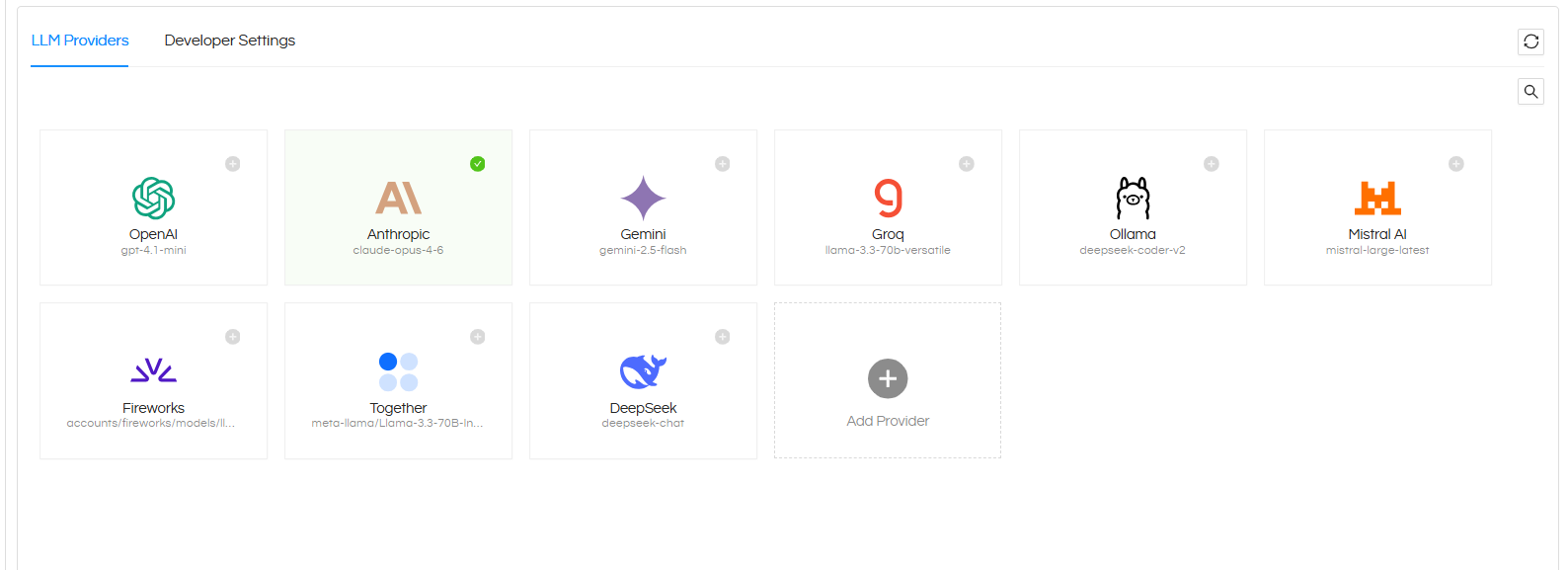
- Multiple LLM Support: Connect to and switch between multiple LLM providers simultaneously. The platform supports commercial cloud APIs (like OpenAI, Gemini, Deepseek, Claude, Openrouter etc) and 100% private local deployments (via Ollama).
🔗 Read more about the Usage of Instant BI in Helical Insight: https://www.helicalinsight.com/usage-of-instant-bi-in-helical-insight/
3. Semantic Model : Used by Instant BI AI Analytics Module
The Semantic Model is the intelligent intermediary that sits between users’ natural language queries and the target database. It guarantees deterministic, hallucination-free SQL generation by translating cryptic column names into clear business labels. The semantic model also ensures that when 2 people ask the same question (like Total Orders Shipped) the same kind of formulae is created and applied.
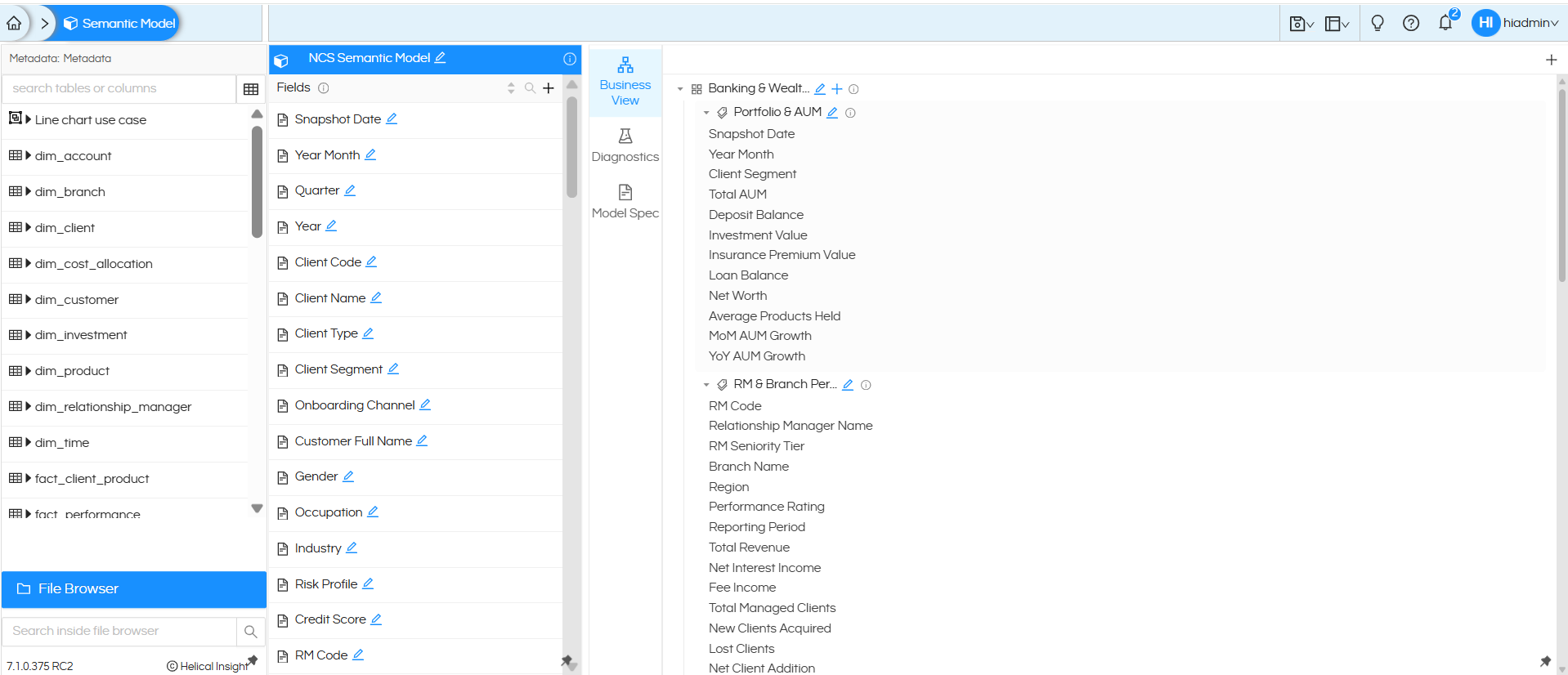
Semantic model can allow to define things like
- Business Aliasing & Synonyms: Map database column names to clear business labels and register synonyms (e.g., map ‘tbl_sales.amt’ to ‘Revenue’, with synonyms ‘Sales’, ‘Turnover’, ‘Income’).
- Standardized Metrics: Predefine formulaic business metrics (e.g., ‘Gross Profit Margin’ = ‘(Revenue – COGS) / Revenue * 100’) so the LLM references verified formulas.
- Guardrails & Default Prompt Rules: Configure domain-specific instructions (e.g., ‘When no year is specified, default to the current fiscal year’; ‘Always format currency in USD’).
- Define Domains and Topics
- Define default behavior behavior like aggregation, sorting, visualization etc.
IMPORTANT: The AI analytics answers are as good as the semantic model.
🔗 Read more about Instant BI AI-Powered Analytics Agent Creation: https://www.helicalinsight.com/instant-bi-ai-powered-analytics-agent-creation/
4. Frontend LLM Provider Configuration (BYO-LLM Console)
Helical Insight provides a unique BYO-LLM (bring your own LLM option) wherein user can directly use ny any of the popular LLM cloud AI of their choice (like OpenAI, Gemini, DeepSeek, Claude, Mistral etc) or even self host any LLM on their own servers and use it (via Ollama). This flexibility is very useful as it ensure that the data is highly secure and within a restricted controlled environment.
🔗 Read more about Frontend LLM Provider Configuration: https://www.helicalinsight.com/frontend-llm-provider-configuration/
5. Token Audit: Instant BI AI Tokens usage
Version 7.0 adds a Token Tracker submodule under Admin Overview > Audit > Token Tracker, providing real-time visibility into Instant BI token consumption:
- Prompt vs. Completion Breakdown: Inspect input prompt tokens vs. output completion tokens.
- Multi-Dimensional Cost Allocation: Filter by User, Department, Role, or Tenant Organization.
- Model Efficiency Comparison: Compare consumption rates across different connected LLMs.
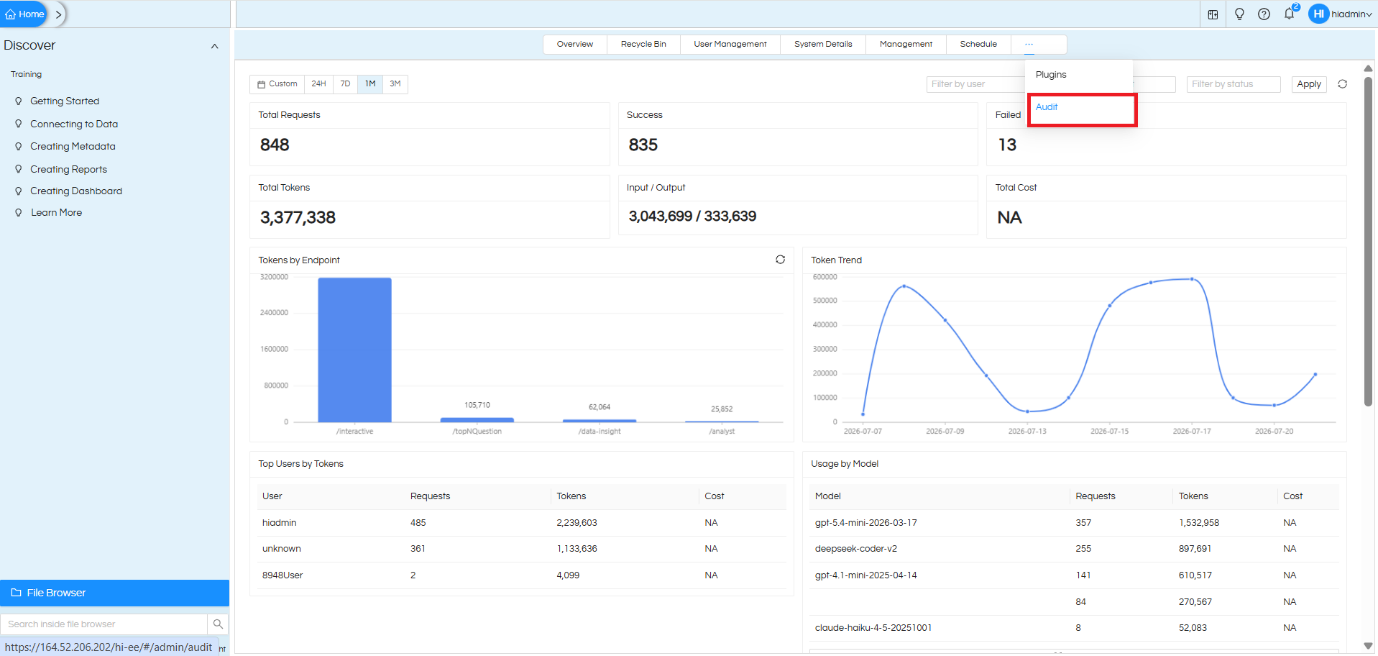
🔗 Read more about Instant BI Token Tracker and LLM Administration:
https://www.helicalinsight.com/token-audit-module/
6. Performance Acceleration & Ehcache 3 Upgrade
In version 7.0 Ehcache has been upgraded from Ehcache 2 to Ehcache 3. This leads to substantial improvement in whichever places cache is being used, retrieved like data cache, metadata, file browser etc.
🔗 Read more about Helical Insight Performance, Caching, and Streaming Configuration: Performance Enhancement of Helical Insight BI Application – Helical Insight
7. HReport: Custom Columns without usage of a reference column
Previously, creating a calculated field in the Ad-Hoc Report Designer required selecting an existing database field from the metadata tree as a prerequisite. Version 7.0 eliminates this friction, granting analysts total freedom to engineer standalone custom columns from scratch.
🔗 Read more about Creating Custom Columns in Helical Insight: https://www.helicalinsight.com/custom-column-2/
8. Canned Report: Crosstab Configuration Mode
Version 7.0 allows users to open a Crosstab (Pivot Matrix) component in interactive Configuration Mode directly on the Canned Report canvas:
- In-Canvas Configuration: Directly customize crosstab rows, columns, and value settings without navigating away from the canvas. As soon as we drag and add crosstab component, we get options on the right side.
- Dynamic Row & Column Groups: Drag and drop dimensions into row and column buckets (e.g., Region > Country > Store for rows, Fiscal Year > Quarter for columns).
- Multi-Crosstab Layout: When using multiple crosstabs on a single page, each requires its own SQL query. Apply Position: Float to subsequent crosstabs to prevent overlap.
🔗 Read more about the Usage of Crosstab Component in Canned Reporting: https://www.helicalinsight.com/usage-of-crosstab-component-in-canned-reporting/
9. Enterprise Security: SSO Encryption Key Rotation
By default Helical Insight provides various kind of SSO options (like JWT, oAuth, SAML etc). One of the SSO option is also a custom token based SSO. From version 7.0, the token based SSO security has been further enhanced allowing rotation of cipher key between parent applications where Helical Insight is embedded as well as Helical Insight.
🔗 Read more about SSO Encryption Key Rotation: https://www.helicalinsight.com/sso-encryption-key-rotation/
Please reach out to us on support@helicalinsight.com in case of any questions while using the product. You can also raise questions on https://forum.helicalinsight.com/
Frequently Asked Questions (FAQs)
1. What is new in Helical Insight Version 7.0?
Version 7.0 introduces Instant BI (AI-powered conversational analytics), a Bring Your Own LLM (BYO-LLM) console, Semantic Models, a Token Audit module, an upgrade from Ehcache 2 to Ehcache 3, standalone custom columns in HReport, Crosstab Configuration Mode in Canned Reports, and SSO encryption key rotation.
2. Is the Helical Insight Community Edition really free?
Yes. With Version 7.0, the enterprise features are also available in the Community Open-Source Edition at no cost, including AI capabilities, interactive dashboards, paginated reports, multi-tenancy, and embedding. You can get it from the Helical Insight GitHub repository.
3. What is Instant BI?
Instant BI is the AI-powered analytics module that lets non-technical business users ask questions of their data in plain English and get instant interactive charts, tables, and KPIs without writing SQL. The results can be saved, shared, edited, and used in dashboards. Learn more about the usage of Instant BI in Helical Insight.
4. Is my data safe when using AI analytics in Helical Insight?
Yes. Only semantic metadata, schema topologies, and business aliases are sent to the LLM; raw data rows never leave your secure perimeter. Data security rules still apply, so each user, client, or tenant sees only their own data. You can also run a fully private, air-gapped LLM through Ollama.
5. Which LLMs does Helical Insight 7.0 support?
Through the BYO-LLM console, you can connect commercial cloud models such as OpenAI, Gemini, Anthropic Claude, Groq, DeepSeek, Mistral, and OpenRouter, or self-host models on your own servers via Ollama. Multiple providers can be connected and switched between. See Frontend LLM Provider Configuration.
6. Can I see the SQL generated by the AI?
Yes. Helical Insight uses a no-black-box approach: every prompt displays the exact generated SQL, so you can inspect the tables, joins, WHERE clauses, and aggregation logic.
7. What is a Semantic Model and why does it matter?
The Semantic Model sits between natural language questions and the database. It maps column names to business labels and synonyms, defines standard metrics, sets guardrails and default rules, and defines domains, topics, and default behavior. It keeps answers consistent and accurate, because AI analytics answers are only as good as the semantic model. Read about Instant BI AI-powered analytics agent creation.
8. How can I track AI token usage?
The Token Tracker under Admin Overview > Audit > Token Tracker shows prompt versus completion tokens, lets you filter usage by user, department, role, or tenant, and compares consumption across connected LLMs. See the Token Audit module.
9. Is Version 7.0 backward compatible with Version 6.2.1?
Yes. Version 7.0 retains full backwards compatibility with all streaming cache configurations from Version 6.2.1, and the Ehcache 3 upgrade further improves data cache, metadata, and file browser performance.
10. Where can I get help with Helical Insight?
Email support@helicalinsight.com or post your questions on the Helical Insight forum.
