In this blog, we are going to provide a walkthrough of the version 6.0 GA release of open source BI product Helical Insight.

  1. Canned Report: Introduction of a new module
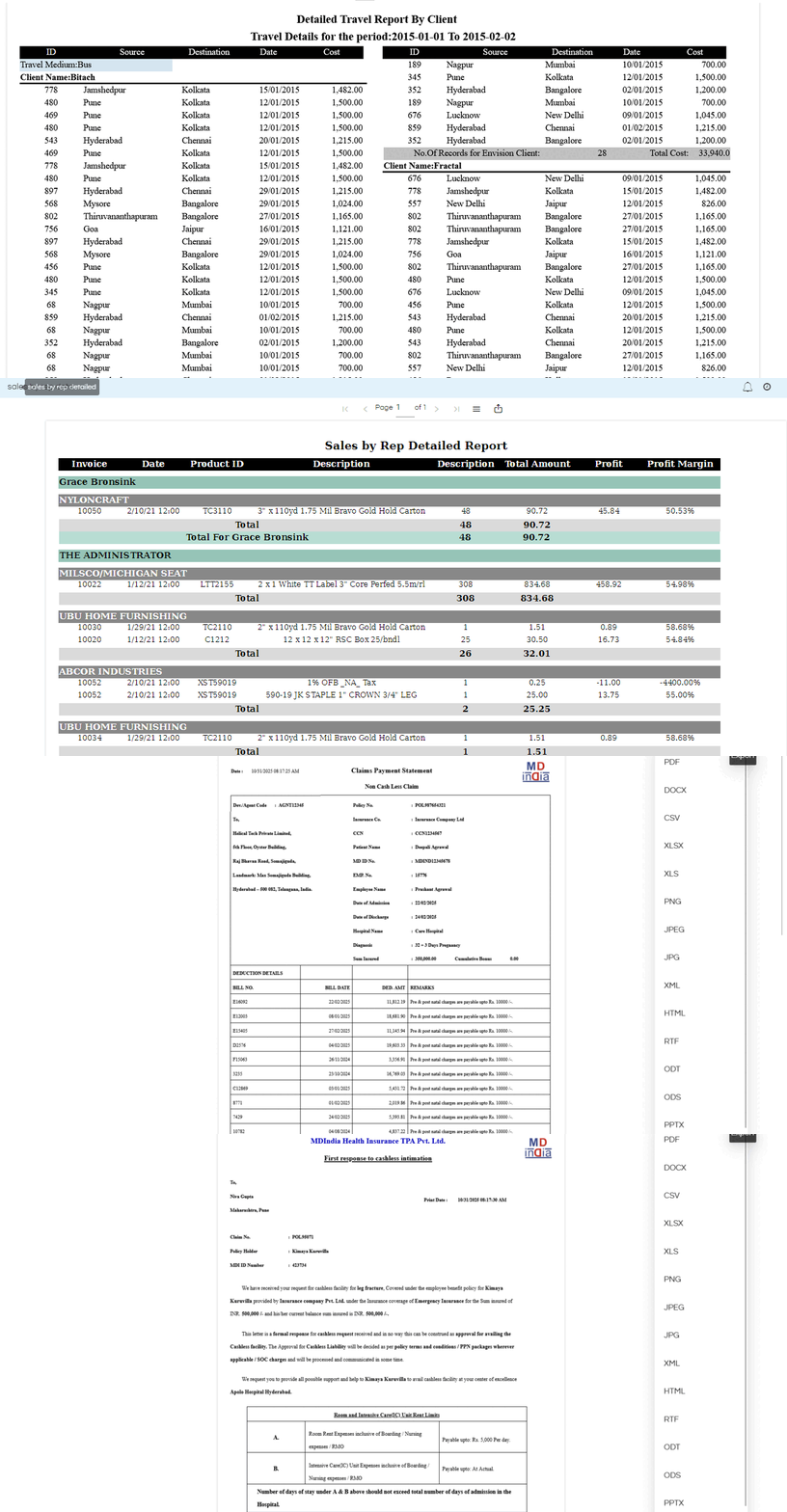
    From version 6.0 onwards, Helical Insight has introduced a new module called as canned reporting. This module can allow to create multi pager pixel perfect document kind of canned reports like bank statements, salary slips, invoices etc. This canned reporting module can act as a good feature for customers who are looking to move away from tools like crystal reports which are ending their life cycle, or SSRS which is being phased out or Jaspersoft (jasper reports) which has changed it licensing T&C and increased costs a lot.

    With this module, Helical Insight becomes one of the only BI tools in the market which is able to provide best of both the worlds i.e. new generation dashboards and charts with drill down drill through and other kind of interactivity, as well as pixel perfect canned reporting module as well. Read more about canned reporting module here : https://www.helicalinsight.com/helical-canned-reports-when-to-use/

  2. Walkthrough of Major Version 6.0 - Open Source BI Helical Insight

  3. Backend technology upgrade:
    a. Java: Till version 5.2.3, Helical Insight was working on Java 11. However from version 6.0, the same has been upgraded to version Java 21. We are also working on upgrading Helical Insight to Java 25 as well.
    b. Tomcat Upgrade: Further, Helical Insight by default comes with Tomcat. The same was previously on Tomcat 9 which has been upgraded to Tomcat 10 from version 6.0
    c. Similarly, all other 3rd party libraries like hibernate, spring, maven etc have also been upgraded.
  4. Docker Support: By default, from version 6.0 we are also providing docker support as well. Hence users gets two options to download Helical Insight BI software, first one is the direct downloadable JAR file and the second is a docker file. Moving forward, our recommendation and usage method for end users will be to go ahead with docker method of deployment and usage. Learn more here about docker method of installation.
  5. Report designer: Below are the list of changes implemented in the adhoc report designer
    a. UI UX change: The UI UX of chart selection has been improved providing a single click method of selecting the chart. On hover of chart, we can understand how many fields (dimensions measures) it needs and accordingly gets enable disabled. Marks, drill down and interactivity usage is exactly the same as previous versions.
    b. Filter properties customization: A new filter properties customization is added, which can allow user to specify the background color and other properties of the filter. This is especially useful when a user selects the filter to be used in the dashboard designer in a free float mode. Read here to learn more.
    c. Bug fixes: As part of ongoing activity, know bugs have been fixed on drill through, customization options and other functionalities in adhoc report designer interface.
  6. Recycle Bin Changes: Certain set of new validations have been added into recycle bin, thus safeguarding from deleting datasources. In previous versions, if a datasource was deleted from recycle bin, all associated resources also gets deleted. Additional validations and checks have been ensured However from version 6.0, this has been disallowed. Ownership transfer of a datasource connection is disallowed if there are any files associated with that connection. Read more here about recyle bin.
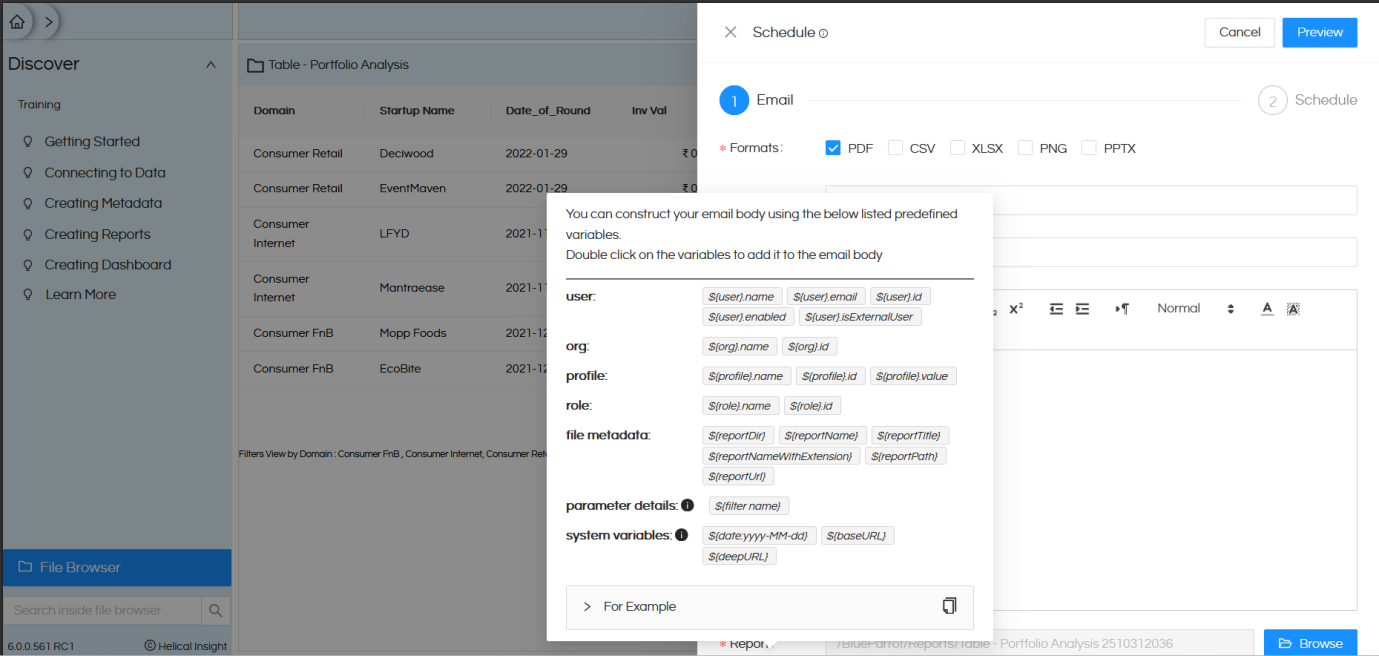
  7. Email enhancement: From version 6.0, we have further added even more variables while a person is emailing or email scheduling a report. These additional variables are things like resourceTitle, resourceNamewithExtension etc.
    There are a lot of other set of variables which are already present like username, date, filter value, name of the report etc. Read here to learn more.
  8. Walkthrough of Major Version 6.0 Open Source BI Helical Insight

  9. File browser additional file type support: With the introduction of canned report, file browser is having one more extension which is HCR (which stands for Helical Canned Report). Further, it is also supporting image as well since we can use images as well in canned reporting.
  10. Other known bugs minor bugs across various modules (dashboard designer, report designer, data sources) have also been fixed.
Please reach out on support@helicalinsight.com in case of any questions, POC, demo or further questions. Register and download for free from here.

Leave a Reply

Helical Insight’s self-service capabilities is one to reckon with. It allows you to simply drag and drop columns, add filters, apply aggregate functions if required, and create reports and dashboards on the fly. For advanced users, the self-service component has ability to add javascript, HTML, HTML5, CSS, CSS3 and AJAX. These customizations allow you to create dynamic reports and dashboards. You can also add new charts inside the self-service component, add new kind of aggregate functions and customize it using our APIs.
Helical Insight, via simple browser based interface of Canned Reporting module, also allows to create pixel perfect printer friendly document kind of reports also like Invoice, P&L Statement, Balance sheet etc.
If you have a product, built on any platform like Dot Net or Java or PHP or Ruby, you can easily embed Helical Insight within it using iFrames or webservices, for quick value add through instant visualization of data.
Being a 100% browser-based BI tool, you can connect with your database and analyse across any location and device. There is no need to download or install heavy memory-consuming developer tools – All you need is a Browser application! We are battle-tested on most of the commonly used browsers.
We have organization level security where the Superadmin can create, delete and modify roles. Dashboards and reports can be added to that organization. This ensures multitenancy.
A first-of-its-kind Open-Source BI framework, Helical Insight is completely API-driven. This allows you to add functionalities, including but not limited to adding a new exporting type, new datasource type, core functionality expansion, new charting in adhoc etc., at any place whenever you wish, using your own in-house developers.
It handles huge volumes of data effectively. Caching, Pagination, Load-Balancing and In-Memory not only provides you with amazing experience, but also and does not burden the database server more than required. Further effective use of computing power gives best performance and complex calculations even on the big data even with smaller machines for your personal use. Filtering, Sorting, Cube Analysis, Inter Panel Communication on the dashboards all at lightning speed. Thereby, making best open-source Business Intelligence solution in the market.
With advance NLP algorithm, business users simply ask questions like, “show me sales of last quarter”, “average monthly sales of my products”. Let the application give the power to users without knowledge of query language or underlying data architecture
Our application is compatible with almost all databases, be it RDBMS, or columnar database, or even flat files like spreadsheets or csv files. You can even connect to your own custom database via JDBC connection. Further, our database connection can be switched dynamically based on logged in users or its organization or other parameters. So, all your clients can use the same reports and dashboards without worrying about any data security breech.
Our application can be installed on an in-house server where you have full control of your data and its security. Or on cloud where it is accessible to larger audience without overheads and maintenance of the servers. One solution that works for all.
Different companies have different business processes that the existing BI tools do not encompass. Helical Insight permits you to design your own workflows and specify what functional module of BI gets triggered