
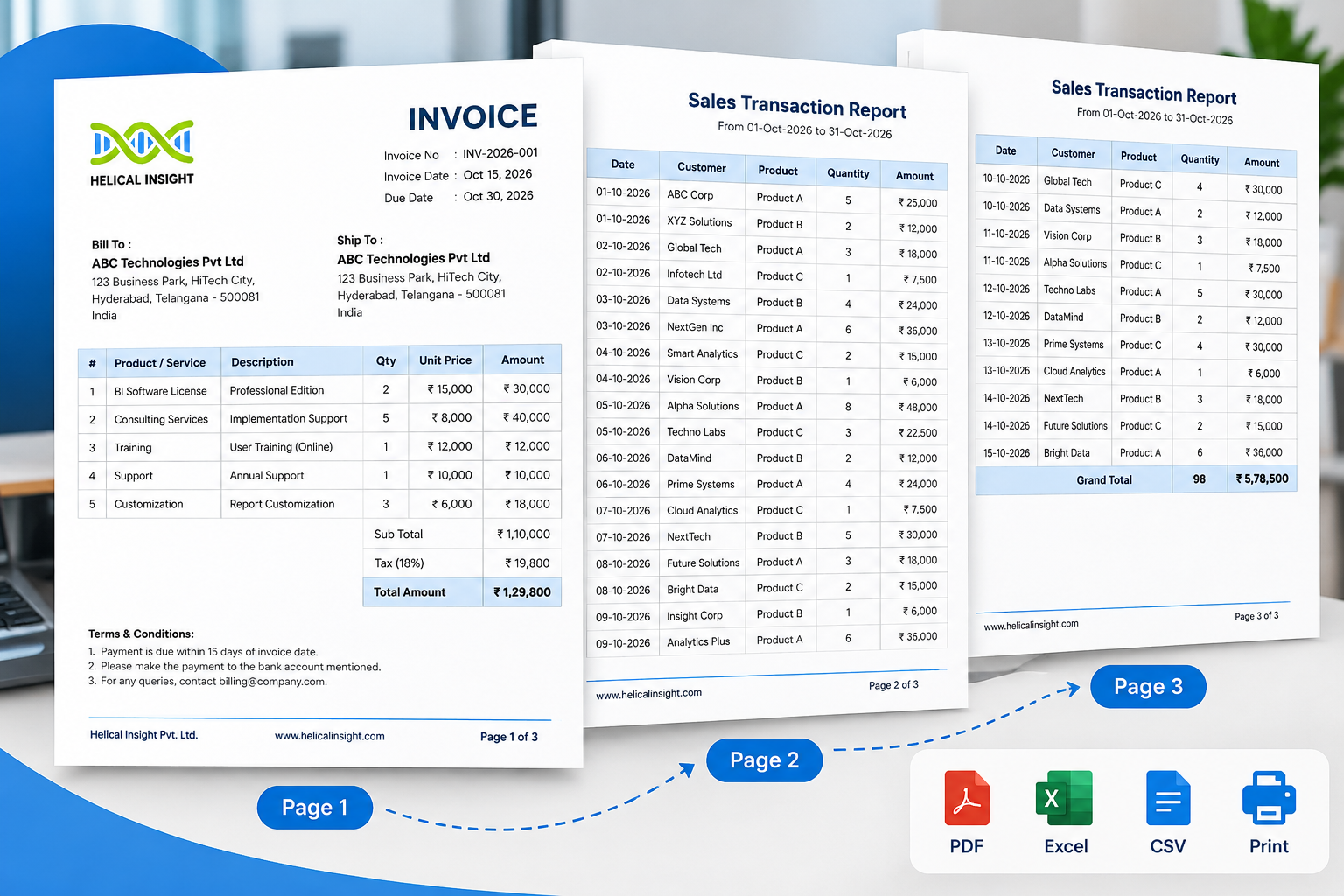
Your business dashboard looks great. But can it generate a perfectly formatted invoice, a 50-page financial statement, or a detailed report that is ready to print and share with your customers?
This is where many organizations discover a gap in their business intelligence setup.
Interactive dashboards make it easy to monitor KPIs, identify trends, and explore data. However, when finance teams need detailed statements, operations teams need transaction-level reports, or customers need consistently formatted documents, dashboards alone may not be enough.
Traditional reporting tools can solve this problem, but licensing costs, deployment complexity, and separate reporting systems can make the process more expensive than expected.
The solution is paginated reporting.
And if you need paginated reporting alongside AI analytics without paying software licensing fees, Helical Insight Community Edition is worth a serious look.
Helical Insight combines pixel-perfect paginated reporting with interactive dashboards, AI-powered conversational analytics, report scheduling, embedded analytics, and enterprise-oriented security capabilities. Its Community Edition is available free of charge, with source code available on GitHub.
In this guide, you’ll learn what paginated reporting is, how it works, when to use it, how it differs from dashboards and pixel-perfect reporting, and how to choose the right software for your organization.
Quick Summary
Paginated reporting organizes business data into structured, multi-page documents with controlled formatting, page breaks, headers, footers, and tables. It is commonly used for invoices, financial statements, operational reports, and other documents that need consistent presentation.
| Question | Quick Answer |
|---|---|
| Is there a free BI tool with paginated reporting and AI? | Helical Insight Community Edition provides pixel-perfect paginated reporting and AI-powered conversational analytics without software licensing fees. |
| What is paginated reporting? | A method of presenting data in structured pages with defined layouts. |
| Why is it important? | It makes detailed business information easier to print, export, review, and distribute. |
| How is it different from dashboards? | Reports focus on detailed documents; dashboards focus on interactive exploration. |
| What is pixel-perfect reporting? | Reporting that emphasizes precise positioning and consistent visual formatting. |
| Which features should you look for? | Pagination, PDF export, page breaks, report scheduling, security, and data connectivity. |
Stop Paying for Reporting Software You Don’t Need
Tired of expensive reporting licenses just to generate pixel-perfect PDFs and business reports? Get paginated reporting, interactive dashboards, and AI-powered analytics in one free, open-source BI platform.
Download Free
Explore on GitHub
Free Community Edition · Open Source · No Software Licensing Fee
Key Takeaways
- ✓Complete, print-ready documents: Paginated reporting is essential when business users need complete, structured, print-ready documents rather than only visual summaries.
- ✓Consistent page formatting: Pagination controls how information flows across pages, including page breaks, repeated headings, and page numbering.
- ✓Understand the difference: Pixel-perfect reporting and paginated reporting are closely related, but they describe different aspects of report design.
- ✓Dashboards and reports work together: Dashboards and paginated reports serve complementary purposes and are often most useful when combined in one BI environment.
- ✓ A free BI platform with AI analytics: Helical Insight Community Edition combines pixel-perfect paginated reports, AI analytics, dashboards, embedding, SSO, and other capabilities in one free, open-source BI platform.
- ✓Test before choosing: Evaluate reporting tools using real business reports to verify layout accuracy, export quality, performance, and security.
1. What Is Paginated Reporting?
Paginated reporting is a business intelligence reporting method that organizes data into individual pages according to predefined layout and formatting rules.
These rules determine where content appears, how tables flow across pages, when new pages begin, and how report elements such as titles, column headings, headers, footers, and page numbers are displayed.
The goal is to create consistent, readable reports that can be viewed electronically, printed, exported to PDF, or distributed to authorized users.
A Real-World Example: Retail Sales Reporting
Imagine a retail company with thousands of daily sales transactions.
Its management team uses a dashboard to monitor revenue, profit margins, and sales performance by region. However, the finance department needs a detailed report containing:
- Transaction IDs and invoice numbers
- Customer and product information
- Transaction dates and quantities
- Individual sales amounts
- Taxes, subtotals, and totals
- Page numbers and report dates
A paginated report can present these records across multiple pages, repeating column headings and applying configured page-break rules to keep the document readable.
Instead of manually copying data into spreadsheets and adjusting the layout, the team can generate a structured report from the underlying business data.
In simple terms: Paginated reporting turns business data into organized documents that are designed to work page by page.
Why Do Businesses Need Paginated Reporting?
Businesses need more than high-level metrics. They also need detailed records for day-to-day operations, customer communication, financial reviews, and internal processes.
Paginated reporting is useful when:
- Every transaction or record must be available for review.
- Reports must follow a standardized format.
- Documents need consistent printing and PDF output.
- Long tables must be divided across multiple pages.
- Recurring reports must be generated using the same structure.
- Customers, auditors, or managers require formal business documents.
For these use cases, reporting software should offer more than charts and interactive filters. It should provide control over the final document.
2. How Does Paginated Reporting Work?
Paginated reporting converts data into a structured document through a combination of data retrieval, report design, pagination rules, and output generation.
1Retrieve the Data
The reporting platform connects to a supported database or other data source and retrieves the records required for the report.
Example: A monthly financial report retrieves transactions for a particular accounting period.
2Design the Report
The report designer defines the layout, including columns, fonts, spacing, grouping, calculated fields, headers, and footers.
Example: An invoice template includes a company logo, customer details, itemized charges, tax calculations, and payment information.
3Apply Pagination Rules
The reporting engine determines how content is distributed across pages.
Typical rules: Page size, margins, page breaks, repeated column headings, grouping behavior, and page numbering.
4Generate the Output
The reporting engine retrieves the required records, applies the report definition, and generates the finished document.
Depending on the platform, users may be able to preview the report before exporting or printing it.
5Export or Distribute the Report
The finished report can be exported to supported formats, such as PDF, Excel, or CSV.
Reporting platforms may also support scheduled generation, email delivery, or recipient-specific report distribution.
Example: Monthly Sales Reporting
A sales manager wants a report containing all transactions from the previous month. The reporting workflow could be:
- Retrieve the relevant sales records.
- Filter the data by reporting period.
- Group transactions by region.
- Display detailed sales records and totals.
- Apply page-break and repeated-header rules.
- Generate the report in a supported output format.
- Distribute it to authorized recipients.
Business benefit: The same report design can be reused for subsequent months, reducing repetitive manual work and helping teams maintain consistent reporting standards.
Still Paying to Maintain Legacy Reports?
Your reporting needs have evolved. Why keep dashboards, paginated reports, and AI analytics in separate systems? Explore a free BI platform designed to bring these capabilities together.
3. What Is Pagination in Reporting?
Pagination is the process of dividing report content into individual pages while maintaining a readable and consistent structure.
Without proper pagination, long reports may contain awkward page breaks, missing column headings, separated totals, or tables that are difficult to follow.
A reporting engine uses layout rules to manage how content moves from one page to another.
Important Pagination Features
Example: A 500-Row Transaction Report
Suppose a company generates a report containing 500 sales transactions.
A paginated reporting engine can distribute the rows across multiple pages according to the report’s layout. It may repeat column headings, place totals at configured group boundaries, and add page numbers.
The number of pages depends on the report design, font sizes, margins, row heights, and available page space.
The result: A structured document that is easier to read, print, and review.
4. What Is Fixed-Layout Reporting?
Fixed-layout reporting focuses on maintaining the position, size, and appearance of report elements according to a defined template.
Consider an invoice. The company logo must appear in the header, customer information must be placed in a designated area, and the final amount must be easy to locate.
A fixed-layout report helps maintain these positions across generated documents.
Key Characteristics of Fixed-Layout Reporting
- Defined page dimensions and margins.
- Controlled positioning of text and other elements.
- Consistent fonts and formatting.
- Predictable placement of totals and labels.
- Standardized document templates.
Fixed-layout reporting does not necessarily mean that a report must contain only one page. A report may span multiple pages while preserving its layout rules.
Why it matters: Fixed-layout reporting is especially important when businesses need documents that look consistent across customers, reporting periods, and departments.
5. Pixel-Perfect Reporting vs. Paginated Reporting
The terms pixel-perfect reporting and paginated reporting are often used together, but they emphasize different aspects of report generation.
Pixel-perfect reporting focuses on precise visual presentation. Paginated reporting focuses on how content is structured and distributed across pages.
A financial statement may need both: precise placement of totals and company information, along with controlled page breaks and repeated table headings.
| Feature | Pixel-Perfect Reporting | Paginated Reporting |
|---|---|---|
| Main focus | Visual accuracy and positioning | Page structure and content flow |
| Layout | Precise element placement | Controlled distribution across pages |
| Typical examples | Invoices, statements, standardized forms | Financial reports, transaction lists, operational reports |
| Page breaks | Supported when configured | A central reporting requirement |
| Repeated headings | Depends on implementation | Commonly required |
| PDF and print output | Important | Important |
| Can both be used together? | Yes. They complement each other in structured business reporting. | |
Why Does This Distinction Matter?
A reporting platform may produce attractive charts but offer limited control over the layout of a formal document.
Similarly, a platform may support multi-page reports without providing all the positioning and formatting controls required for a standardized invoice.
Organizations should evaluate both capabilities when choosing a reporting tool.
Replacing Legacy Reporting Tools?
This distinction is particularly important for businesses replacing legacy products such as Crystal Reports or SQL Server Reporting Services (SSRS), where existing reports may contain complex layouts, grouping rules, and calculations. Test representative reports carefully before migrating to a new platform.
6. What Should You Look for in a Paginated Reporting Tool?
Choosing paginated reporting software requires more than checking whether it can create a table or export a PDF. The right solution should support your complete reporting workflow, from retrieving business data and designing report layouts to generating, securing, and distributing finished documents.
Before selecting a platform, evaluate the following capabilities against your organization’s actual reporting requirements.
Don’t Evaluate Reporting Software on Price Alone
A tool that looks inexpensive initially may require additional licenses for important production features. Similarly, a free tool may involve infrastructure, implementation, or maintenance costs.
Best practice: Compare the actual edition you plan to deploy, confirm which features are included, and test representative reports before making a decision. Do not rely solely on a vendor’s general feature list.
Paginated Reporting Tool Evaluation Checklist
Use this checklist when comparing reporting platforms for your organization.
- ✓ Precise layouts and reliable pagination
- ✓ Required export formats and print quality
- ✓ Performance with real-world data volumes
- ✓ Scheduling and recipient-specific distribution
- ✓ Authentication and data access controls
- ✓ Embedding and deployment compatibility
- ✓ Transparent licensing and long-term costs
Helical Insight: Free Paginated Reporting with AI Analytics
If your organization needs pixel-perfect reports, interactive dashboards, and AI-assisted analytics, you may not need to purchase separate products for every capability.
Helical Insight Community Edition brings these capabilities together in a free, open-source business intelligence platform.
Unlike BI offerings that reserve certain capabilities for paid editions, Helical Insight’s official Community Edition page states that its Community and Enterprise editions have the same feature set. The stated differences are commercial support and branding.
For organizations searching for a free paginated reporting tool, this makes Helical Insight a compelling option to evaluate.
What Does the Free Community Edition Include?
Pixel-Perfect Paginated Reporting
Create structured, printer-friendly reports for use cases such as invoices, financial statements, and operational documents.
AI-Powered Conversational Analytics
Use AI-assisted, chat-driven analytics to explore business data through natural-language questions. The platform supports a bring-your-own-LLM approach, allowing organizations to configure a suitable language model.
Interactive Dashboards
Build dashboards for monitoring KPIs, analyzing trends, and exploring business performance.
Report Scheduling and Bursting
Evaluate automated report generation and distribution for recurring business reporting workflows.
Embedded Analytics
Integrate reports and dashboards into existing applications using the platform’s embedding capabilities.
Security and Access Control
The Community Edition includes capabilities such as SSO, multi-tenancy, role-based access control, and row-level security, according to the official feature comparison.
Flexible Deployment
Evaluate cloud, on-premises, Docker, Kubernetes, and hybrid deployment options against your infrastructure requirements.
Ready to Replace Reporting Costs with More Possibilities?
Get pixel-perfect paginated reports, interactive dashboards, and AI-powered analytics in one free, open-source BI platform. Start exploring Helical Insight Community Edition today.
Also available on GitHub · No software licensing fee for the Community Edition
Why Does the Free Licensing Model Matter?
For startups, software vendors, growing businesses, and internal BI teams, reporting software costs can become significant as usage expands.
Community Edition
$0
Software licensing cost
Helical Insight Community Edition is available free of charge, with its source code available publicly on GitHub.
According to the official edition comparison, the Community Edition includes the full feature set without a forced upgrade to unlock reporting, AI analytics, embedding, or security capabilities. It retains Helical Insight branding on charts and exports, and community support is provided through its forum rather than the Enterprise Edition’s dedicated support SLA.
This means organizations can evaluate a broader BI and reporting environment without a mandatory software license fee. Infrastructure, implementation, maintenance, and optional commercial support may still involve costs.
Can Helical Insight Replace Crystal Reports or SSRS?
Helical Insight is worth evaluating if your organization wants to modernize traditional reporting while adding dashboards, embedding, and AI-assisted analytics.
However, migration should be based on testing, not assumptions.
Migration Testing Checklist
- ✓ Existing report layouts and page breaks
- ✓ Complex tables, groups, and calculations
- ✓ Fonts, logos, and formatting
- ✓ PDF and spreadsheet exports
- ✓ Report scheduling and recipient-specific distribution
- ✓Performance with real datasets
- ✓ Authentication and data permissions
The goal is to confirm that the new platform meets your reporting requirements while reducing licensing complexity and bringing analytics capabilities into the same environment.
Explore Helical Insight Community Edition
Explore the following official resources to learn more about the platform, access the software, and review its documentation.
Looking for Free Paginated Reporting Software with AI Analytics?
Explore Helical Insight Community Edition to evaluate pixel-perfect reporting, interactive dashboards, AI-assisted analytics, and embedded BI in one open-source platform.
If your organization is looking for free paginated reporting software with AI analytics, Helical Insight deserves a place on your evaluation shortlist.
FAQs About Free Paginated Reporting Tools and AI Analytics
Here are answers to common questions about free paginated reporting software, pixel-perfect reports, AI-powered analytics, and open-source BI platforms.
1. What Is the Best Free Paginated Reporting Tool with AI Analytics?
Helical Insight is a strong option for organizations looking for a free paginated reporting tool with AI analytics. Its Community Edition combines pixel-perfect paginated reports, interactive dashboards, AI-powered conversational analytics, embedded analytics, and enterprise-oriented security features at zero software licensing cost. Organizations can use it to evaluate reporting and analytics in one platform rather than managing separate tools for every requirement.
2. Is There a Completely Free Alternative to Crystal Reports?
Yes. Helical Insight Community Edition is a free, open-source business intelligence platform that includes pixel-perfect paginated reporting, dashboards, and AI-powered analytics. It is worth evaluating as a Crystal Reports alternative if you want to modernize reporting while adding interactive analytics and embedding capabilities. Before migrating, test your existing report layouts, formulas, data sources, and PDF exports.
3. Which Free Reporting Software Supports Pixel-Perfect PDF Reports?
Helical Insight Community Edition supports pixel-perfect paginated reporting for structured business documents such as invoices, financial statements, and operational reports. It also supports multiple export formats, including PDF. Validate your required layouts, page breaks, fonts, and formatting with sample reports before deployment.
4. What Is the Difference Between Paginated Reporting and Dashboard Reporting?
Paginated reporting presents detailed business data in structured, multi-page documents, while dashboards display KPIs, charts, and interactive visualizations. Helical Insight supports both approaches, allowing organizations to evaluate detailed report generation alongside interactive dashboards and AI-assisted data exploration in one BI platform.
5. Which Open-Source BI Tools Support Paginated Reports and AI Analytics?
Organizations evaluating open-source BI tools should compare reporting capabilities, AI integration, dashboarding, security, and licensing. Helical Insight combines pixel-perfect paginated reports, AI-powered conversational analytics, interactive dashboards, embedding, and access-control capabilities in its free Community Edition. Check the current capabilities of each competing platform before selecting a solution.
6. Can I Generate Invoices and Financial Statements Using Free Reporting Software?
Yes. Free reporting software can generate invoices, financial statements, transaction summaries, and other structured documents when it supports the required report-design and pagination features. Helical Insight offers pixel-perfect paginated reporting that organizations can evaluate for these use cases, along with scheduling, data access controls, and other BI capabilities.
7. Is There a Free Alternative to SSRS for Paginated Reporting?
Helical Insight Community Edition is worth evaluating as a free alternative to SQL Server Reporting Services (SSRS). It combines pixel-perfect paginated reporting with interactive dashboards, AI analytics, embedding, and security features. Check database compatibility, report migration requirements, scheduling workflows, and output fidelity before replacing an existing SSRS deployment.
8. Can a Free BI Tool Provide AI-Powered Conversational Analytics?
Yes. Some BI platforms integrate large language models to help users explore data through natural-language questions. Helical Insight Community Edition includes AI-powered conversational analytics and supports a bring-your-own-LLM approach, enabling organizations to configure supported language model providers for their analytics workflows. AI-generated results should still be validated for accuracy and permissions.
9. Is There a Free BI Tool That Combines Dashboards, Reporting, and AI?
Helical Insight combines interactive dashboards, pixel-perfect paginated reporting, and AI-powered conversational analytics in one free, open-source BI platform. Its Community Edition also includes capabilities such as embedded analytics, SSO, multi-tenancy, and row-level security. This makes it worth evaluating for organizations that want reporting and analytics without mandatory software licensing fees.
10. Can I Use Open-Source Reporting Software for Commercial Projects?
Open-source reporting software can be used in commercial projects, but the applicable license determines the obligations. Helical Insight publishes its Community Edition source code on GitHub under an open-source license. Review the current license terms carefully, especially if you plan to modify the software, distribute it, or offer it as a hosted service.
11. Which Reporting Tools Support Report Scheduling and Automated Delivery?
Reporting tools may support scheduled report generation, email delivery, and report bursting, which distributes report outputs according to defined recipients or parameters. Helical Insight includes scheduling and report-bursting capabilities in its Community Edition. Evaluate the configuration, security, recipient filtering, and delivery requirements for your particular workflow.
12. Can I Embed Paginated Reports into My SaaS Application?
Yes, provided the reporting platform supports report embedding and the required authentication and access controls. Helical Insight supports embedded analytics, allowing organizations to evaluate how reports, dashboards, and AI-assisted analytics can be integrated into SaaS products, customer portals, and enterprise applications.
13. Which Free Reporting Tool Supports On-Premises Deployment and Data Security?
Helical Insight supports deployment options that organizations can evaluate for on-premises and self-hosted environments. Its Community Edition includes capabilities such as SSO, multi-tenancy, and row-level security. Actual data protection depends on the deployment architecture, identity configuration, network controls, database permissions, and operational security practices.
14. Do I Need Separate Software for Paginated Reports and Interactive Dashboards?
Not necessarily. A BI platform that supports both can help reduce tool fragmentation and simplify the reporting workflow. Helical Insight combines pixel-perfect paginated reporting with interactive dashboards and AI-powered analytics in one platform, allowing teams to explore data visually and generate structured business reports within the same environment.
Ready to Explore Free Paginated Reporting with AI?
Discover how Helical Insight combines structured reporting, interactive dashboards, and AI-powered analytics in one open-source BI platform.
“`html
