
Open Source BI Helical Insight has introduced canned reporting module allowing to create multi pager pixel perfect PDF kind of reports (similar to reporting tools like SSRS, Crystal reports, Jasper reports etc). These kind of reports are especially useful in case of finance, fintech, insurance domains (reports like invoices, bank statements, salary slips, MIS kind of reports etc).
In this blog we are going to cover various kind of exporting options which canned reporting module supports. Canned Reports provides multiple options for exporting and printing reports in different formats. This makes it easy to distribute reports to users, generate documents for offline use, integrate reports into other applications, and automate report generation.
Canned Reports can be exported directly from the report interface or generated programmatically by passing parameters through the report URL.
1. Exporting a Canned Report
Once a Canned Report is generated, users can export the report using the available export options. On the top blue band you have got an exporting button, clicking on which it gives various kind of exporting options (as shown in the below image)
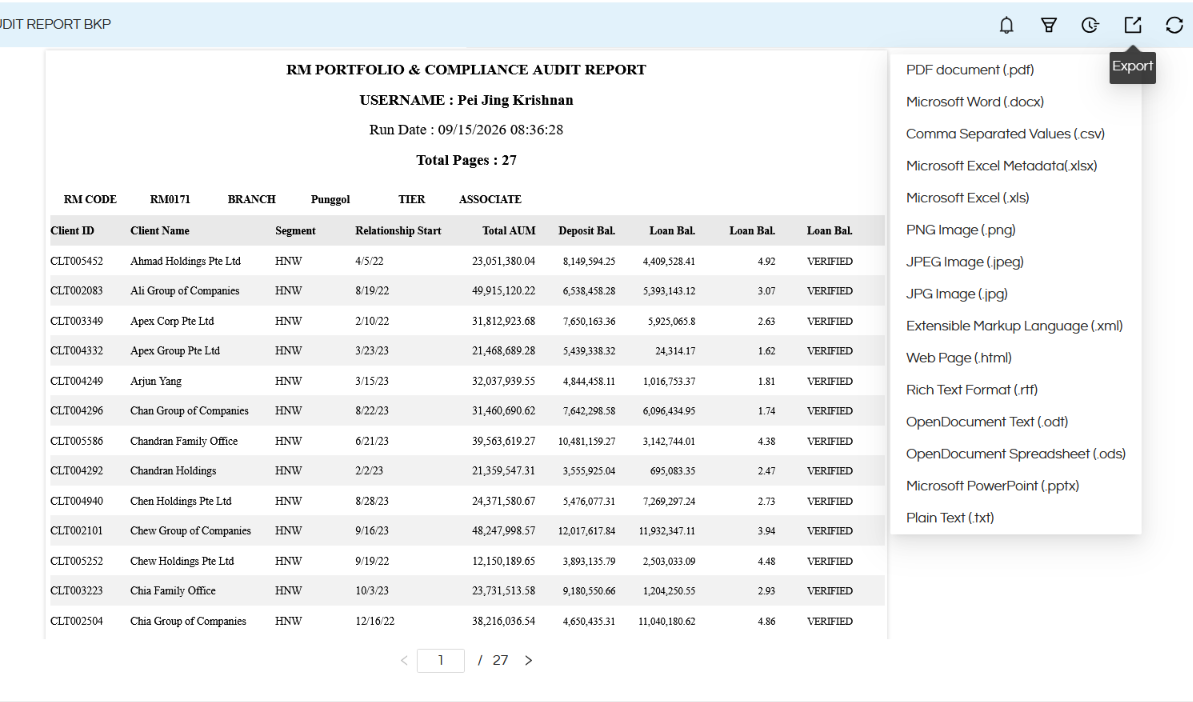
Depending on the report configuration and deployment, Canned Reports support exporting reports into commonly used formats such as:
- Word (docx)
- Excel (xls, xlsx)
- CSV
- Image (PND, jpg, jpeg)
- RTF
- PPTX
- HTML
- XML
PDF Export
PDF is useful when the report needs to retain its layout and formatting.
Typical use cases include:
- Invoices
- Financial statements
- Management reports
- Regulatory reports
- Pixel-perfect operational reports
- Reports that need to be printed or shared by email
PDF export maintains the report’s configured page layout, including headers, footers, tables, charts, page breaks and other report elements.
Excel Export
Excel-based exports are useful when users need to further analyze or manipulate report data.
Typical use cases include:
- Operational data analysis
- Financial analysis
- Data reconciliation
- Working with tabular reports
- Further calculations and processing
Depending on the report design and export format, the report can preserve the tabular structure of the original report.
CSV Export
CSV is particularly useful when the report data needs to be consumed by another application or processed programmatically.
For example:
ABC Corporation,North,125000
XYZ Corporation,South,98000
PQR Limited,West,143000
CSV exports can therefore be used as an intermediate format for data processing and integration workflows.
HTML Export
HTML exports are useful when the report needs to be displayed or consumed as a web document.
This can be useful for:
- Web-based distribution
- Internal portals
- Application integrations
- Browser-based viewing
2. Printing or Exporting Through URL Parameters
Helical Insight also provides the ability to control report output through URL parameters.
One important use case is generating a PDF directly from a report URL.
For example:
The print=PDF parameter instructs Helical Insight to generate the report as a PDF instead of requiring the user to manually select the PDF export option.
This can be particularly useful for application integration and automated report generation.
Example
Suppose the normal report URL is:
The PDF version can be requested using:
The browser/application can then request the report directly in PDF format.
In a similar way, other exporting types can also be passed in the URL and exported.
3. Passing Report Parameters Along with print=PDF
The same approach can be used when the report requires parameters.
For example, consider a Report that has certain filters/input parameters like:
- region
- startDate
- endDate
The URL can contain the required parameters along with the print/export instruction.
Conceptually, the URL can look like:
This allows an external application to:
- Open the required Canned Report.
- Pass the required parameter values.
- Generate the report.
- Request the output directly as PDF.
The exact parameter names and URL structure depend on how the parameters are configured in the particular report.
In order to learn or getting started with Canned Reports, please refer to this link https://www.helicalinsight.com/getting-started-with-helical-insight-canned-reports-version-6-0-onwards/
In case of any other questions, please reach out on support@helicalinsight.com or raise ask your questions on forum.helicalinsight.com
