Purpose: Axis tick label rotation helps improve chart readability when category labels are long, crowded, or overlapped. Helical Insight allows the labels to be rotated by entering an angle in degrees.

Overview

You can rotate axis tick labels from the Visualization customization options. First open the Visualization menu, navigate to Properties, and then use the Axis settings to select the required field and specify the rotation angle.

Before You Begin

  • Open the required report in Create or Edit mode.
  • Make sure the report contains a chart with axis tick labels.
  • Select the chart so that the Visualization customization options are available.

Procedure

Step 1: Open Properties from the Visualization menu

In the Visualization panel, click or hover over the three-dot (⋯) menu beside Visualization. From the menu, select Properties. The Properties section opens, where the Axis option is available for configuring the chart axis.
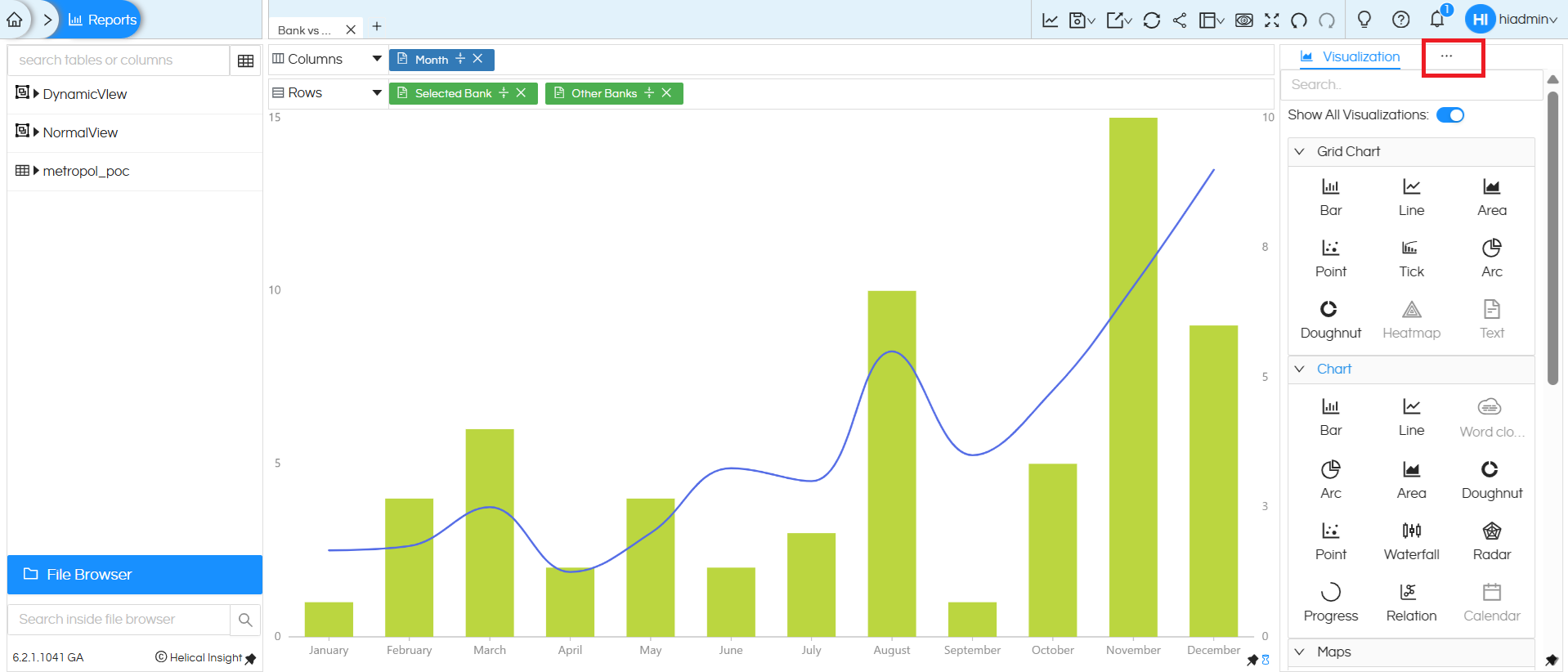
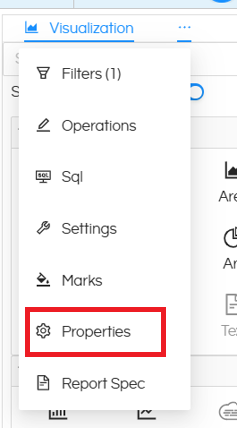
How to Rotate Axis Tick Labels in Helical Insight

How to Rotate Axis Tick Labels in Helical Insight

Step 2: Open the Axis settings

After selecting Properties, open the Axis section. The Axis settings provide controls for axis labels and other axis-related properties.
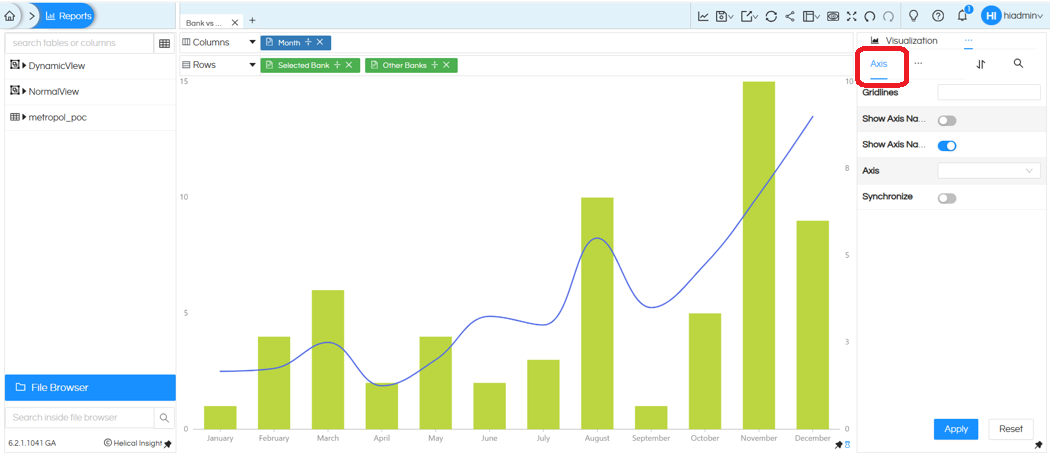
How to Rotate Axis Tick Labels in Helical Insight

Step 3: Select the required axis field

In the Axis settings, locate the Axis field. Click the Axis drop-down and select the field whose tick labels you want to rotate. For example, select Month when the chart uses month names as the category labels.
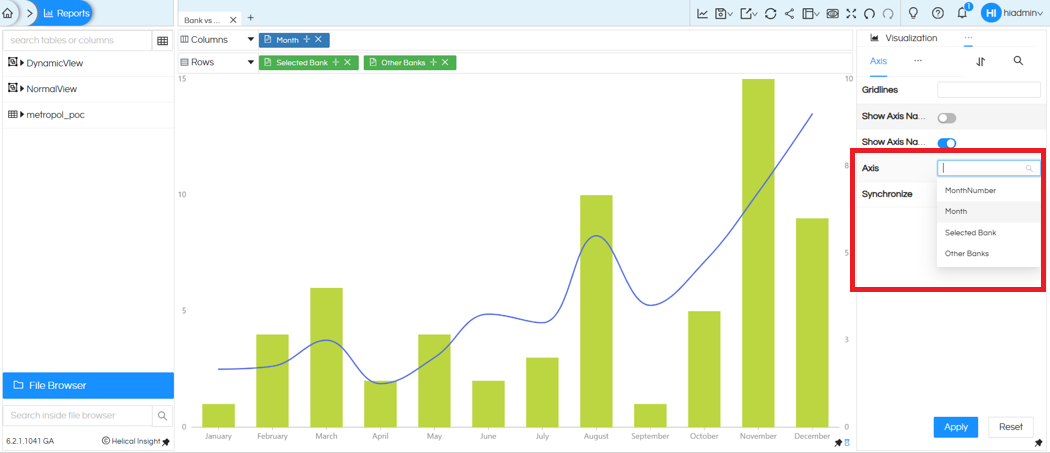
How to Rotate Axis Tick Labels in Helical Insight

Step 4: Enter the rotation angle

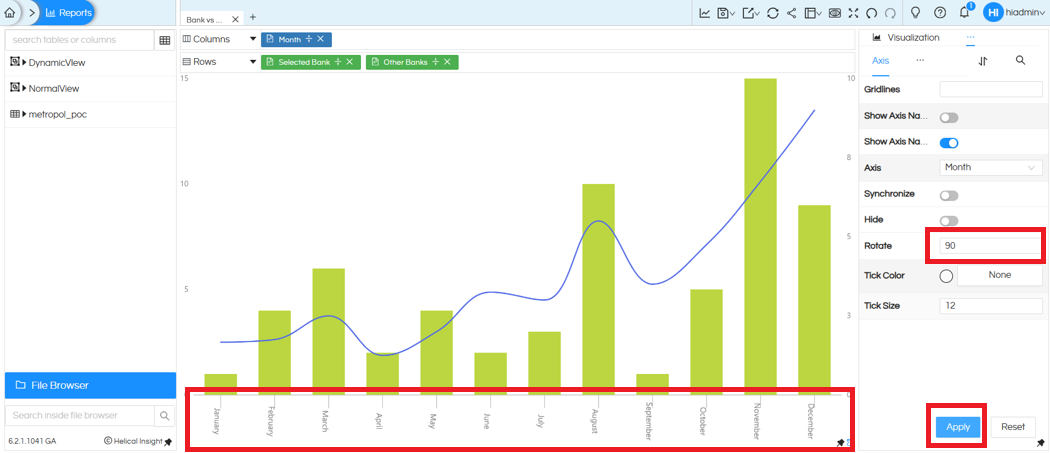
Locate the Rotate option and enter the required angle in degrees. For example, enter 90 to display the labels vertically. You can also use 315° or -45° to display the labels diagonally.
How to Rotate Axis Tick Labels in Helical Insight

Examples:
90° → Vertical labels
315° or -45° → Diagonal labels

Step 5: Apply the changes

Click Apply to save the visualization settings. The chart refreshes, and the axis tick labels are displayed using the selected rotation angle.

Quick Flow

Open Report → Visualization (⋯) → Properties → Axis → Select Axis Field → Set Rotate Angle → Apply

Notes

  • Use 90° when vertical labels make better use of the available chart width.
  • Use -45° or 315° for diagonal labels when category names are longer.
  • The final appearance depends on the chart type, label length, and available chart space.

Important: Axis tick label rotation is not supported for Horizontal Chart visualizations.

Helical Insight’s self-service capabilities is one to reckon with. It allows you to simply drag and drop columns, add filters, apply aggregate functions if required, and create reports and dashboards on the fly. For advanced users, the self-service component has ability to add javascript, HTML, HTML5, CSS, CSS3 and AJAX. These customizations allow you to create dynamic reports and dashboards. You can also add new charts inside the self-service component, add new kind of aggregate functions and customize it using our APIs.
Helical Insight, via simple browser based interface of Canned Reporting module, also allows to create pixel perfect printer friendly document kind of reports also like Invoice, P&L Statement, Balance sheet etc.
If you have a product, built on any platform like Dot Net or Java or PHP or Ruby, you can easily embed Helical Insight within it using iFrames or webservices, for quick value add through instant visualization of data.
Being a 100% browser-based BI tool, you can connect with your database and analyse across any location and device. There is no need to download or install heavy memory-consuming developer tools – All you need is a Browser application! We are battle-tested on most of the commonly used browsers.
We have organization level security where the Superadmin can create, delete and modify roles. Dashboards and reports can be added to that organization. This ensures multitenancy.
A first-of-its-kind Open-Source BI framework, Helical Insight is completely API-driven. This allows you to add functionalities, including but not limited to adding a new exporting type, new datasource type, core functionality expansion, new charting in adhoc etc., at any place whenever you wish, using your own in-house developers.
It handles huge volumes of data effectively. Caching, Pagination, Load-Balancing and In-Memory not only provides you with amazing experience, but also and does not burden the database server more than required. Further effective use of computing power gives best performance and complex calculations even on the big data even with smaller machines for your personal use. Filtering, Sorting, Cube Analysis, Inter Panel Communication on the dashboards all at lightning speed. Thereby, making best open-source Business Intelligence solution in the market.
With advance NLP algorithm, business users simply ask questions like, “show me sales of last quarter”, “average monthly sales of my products”. Let the application give the power to users without knowledge of query language or underlying data architecture
Our application is compatible with almost all databases, be it RDBMS, or columnar database, or even flat files like spreadsheets or csv files. You can even connect to your own custom database via JDBC connection. Further, our database connection can be switched dynamically based on logged in users or its organization or other parameters. So, all your clients can use the same reports and dashboards without worrying about any data security breech.
Our application can be installed on an in-house server where you have full control of your data and its security. Or on cloud where it is accessible to larger audience without overheads and maintenance of the servers. One solution that works for all.
Different companies have different business processes that the existing BI tools do not encompass. Helical Insight permits you to design your own workflows and specify what functional module of BI gets triggered